Case Backlog and Follow-ups
I built an Excel report for a fictional operations queue to see which open cases needed follow-up and how much balance was tied to them. I sorted and filtered the source records, used formulas to flag overdue cases, and built a PivotTable to report case counts and balances by status.
Workbook previews
Project questions and answers
- How did I identify overdue cases?
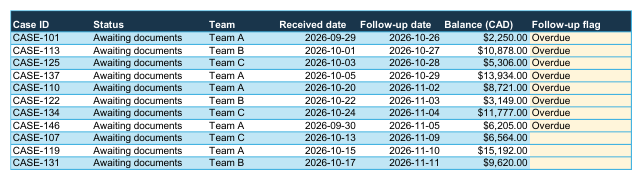
- I used IF, AND, and TODAY to flag open cases with a follow-up date earlier than the current date. The answers below reflect the saved report. The Excel totals can change as the workbook recalculates on a later date.
- How many open cases were overdue, and what was their combined balance?
- COUNTIFS found 16 overdue cases out of 32 open cases. SUMIFS put their combined balance at CAD $127,136.
- How was the full case queue split by status?
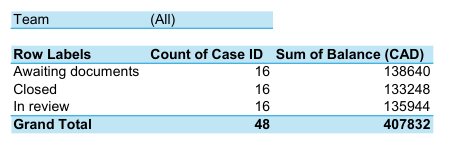
- The PivotTable counted 16 cases awaiting documents, 16 in review, and 16 closed. Across all three statuses, the 48 cases had a combined balance of CAD $407,832.
- How did I test the PivotTable?
- I filtered it to Team B to review that team's cases. Then I cleared the filter, changed a source balance, refreshed the PivotTable, and restored the original balance.
I used a ChatGPT learning chat to practise Excel formulas and built the PivotTable myself.