Possessions Vendor SLA Review
I completed this Excel practice workbook to review vendor turnaround and decide which outstanding reports needed follow-up first. I used date calculations, nested IF formulas, sorting, and a PivotTable to turn 36 fictional possessions cases into a vendor summary. This is a learning project, not employer or customer data.
Workbook previews
Project questions and answers
- How did I check whether each case met its service target?
- I calculated elapsed calendar days using the received date, or a fixed reporting date for pending reports. Nested IF formulas classified each case as received on time, received late, pending on track, or pending overdue. Cases exactly at their target were still within the service-level agreement (SLA).
- What did the full queue show?
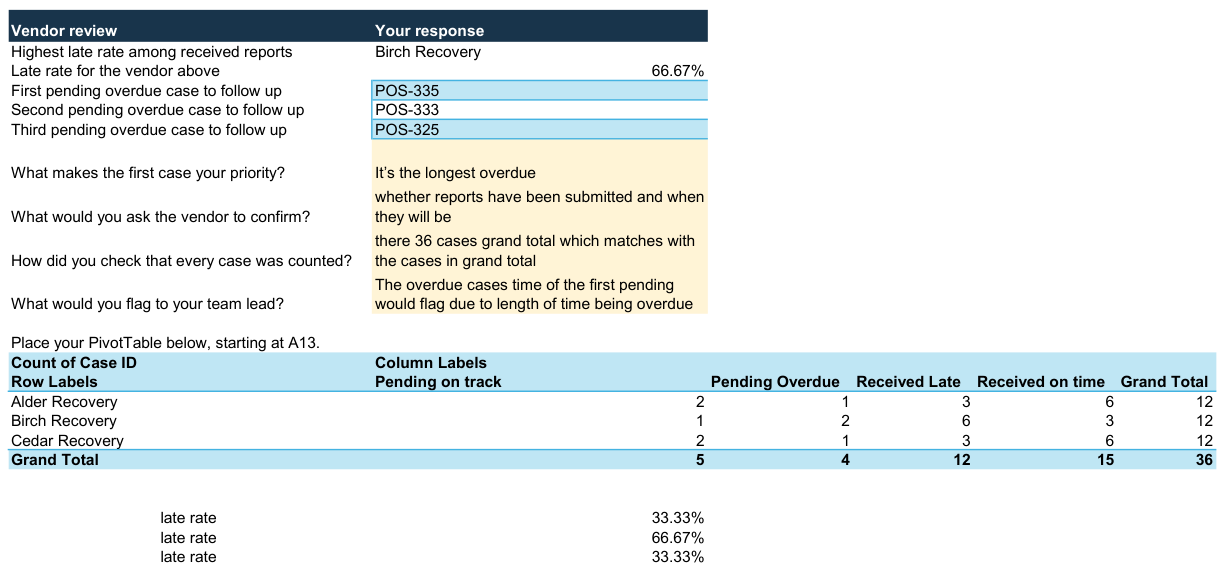
- The vendor PivotTable accounted for all 36 cases: 15 received on time, 12 received late, 5 pending on track, and 4 pending overdue. I also checked for duplicate case IDs and dates that were out of order.
- Which vendor had the highest late rate?
- Birch Recovery had 6 late reports out of 9 received, giving a late rate of 66.7%. Pending reports were excluded from that rate. All vendor names and records in this exercise are fictional.
- Which cases needed attention first?
- I prioritised POS-335, POS-333, and POS-325, which were 4, 3, and 2 days beyond their targets. The next step was to ask the vendors whether the reports had been submitted and, if not, when they would be available.
I practised this exercise in my Excel learning chat. The downloads preserve my submitted workbook and report, including the original written responses.